
Introduction
Security testers, red teams, and bug bounty hunters spend a lot of time chaining reconnaissance, service/version detection, vulnerability lookup and exploit retrieval. AutoPWN Suite automates that pipeline – from discovery to exploit suggestion – reducing manual overhead and letting you focus on investigation and exploitation logic rather than plumbing.
Built in Python and intended to run cross-platform (Linux/macOS/Windows), AutoPWN Suite is modular, scriptable, and designed so you can either run it as a CLI, use the built-in web dashboard, or import the core scanner as an API inside other tooling.
Features
CLI
- Fully automatic mode (
-y) for minimal interaction. - Automatic network range detection and host discovery (ARP or Ping).
- Version-based vulnerability detection via NIST NVD CVE lookup.
- Web app helpers: directory enumeration and basic XSS/LFI/SQLi probes.
- Exploit retrieval from Exploit-DB: downloads PoCs for matched CVEs.
- Multiple modes:
normal,evade,noiseto tune aggressiveness/stealth. - Configurable scan techniques: TCP SYN, TCP Connect, UDP, Window, ACK, FIN, Xmas, Null, Maimon, SCTP.
- Programmatic API (
AutoScanner) for integration and automation. - Multiple output formats: HTML, SVG, TXT.
- Email and webhook reporting on scan completion.
- Daemon mode for periodic background scanning.
Web UI
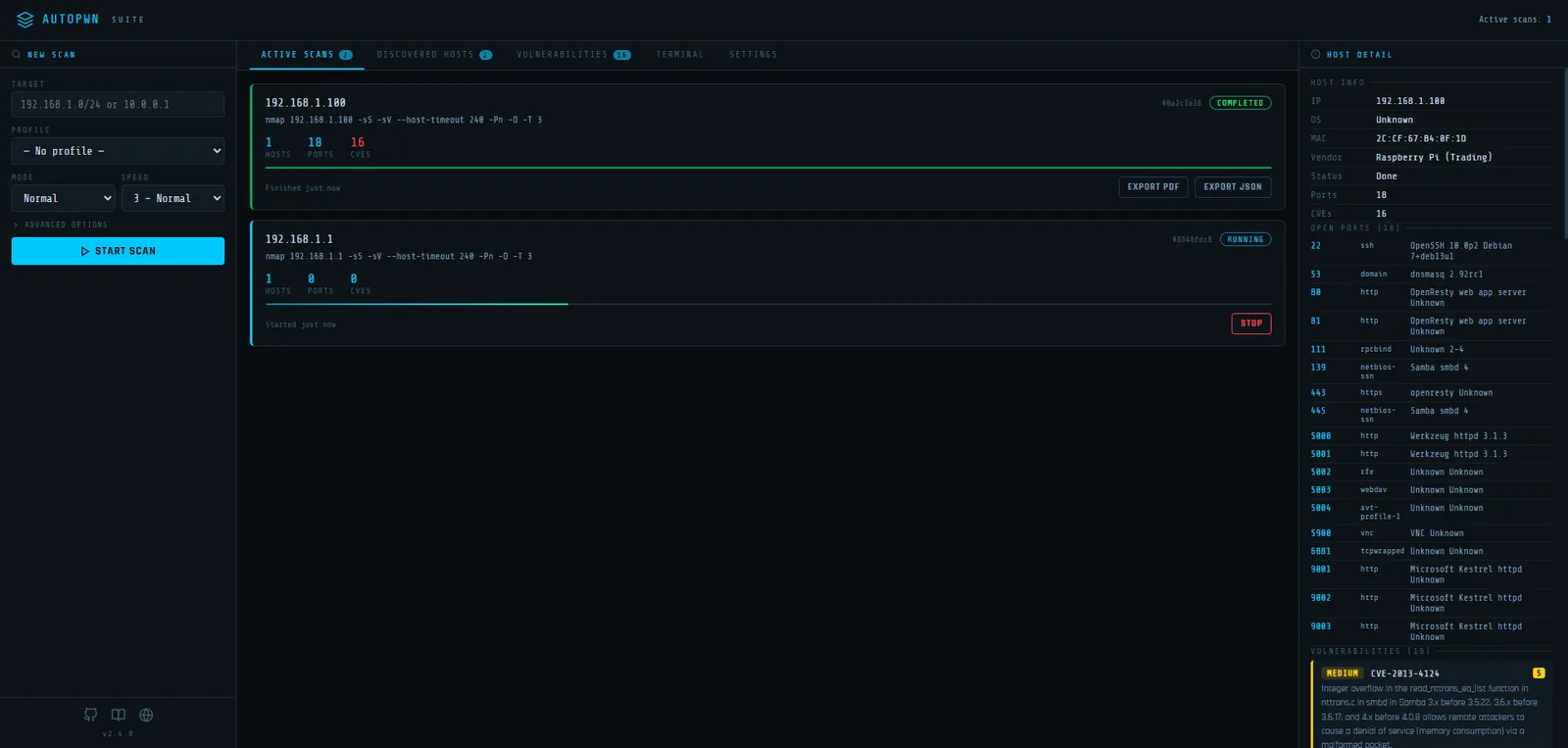
- Multiple concurrent scans – launch and monitor several scans simultaneously from the browser.
- Live terminal output – real-time nmap commands and results streamed via Server-Sent Events (SSE).
- Scan profiles – save and reuse scan configurations (technique, speed, timeout, ports, evasion, custom flags).
- Scheduled scans – set up recurring scans on interval, daily, or weekly schedules with automatic profile loading.
- Email notifications – HTML scan reports with inline result summaries sent on completion.
- Webhook notifications – POST scan results to any webhook endpoint.
- PDF and JSON export – download scan results directly from the dashboard.
- Persistent settings – all settings, profiles, and schedules saved to disk as JSON.
- Configurable via environment variables –
AUTOPWN_WEB_HOST,AUTOPWN_WEB_PORT,AUTOPWN_DATA_DIR. - Docker ready – single-command deployment via Docker Compose.
Demo
AutoPWN Suite has a very user friendly easy to read output.

How It Works
High-level runtime flow
- CLI (
autopwn.py) or Web UI launches a scan. - Host discovery via nmap ARP or Ping scan (
DiscoverHosts). - Port scanning via
PortScanusing python-nmap. - Results analyzed via
AnalyseScanResultsinto port arrays. - Service/version strings converted to search keywords via
GenerateKeyword(searchvuln.py). - Keywords queried against NIST NVD 2.0 API via
searchCVE(nist_search.py). - Exploit references fetched from Exploit-DB via
GetExploitInfo(getexploits.py). - Web-specific checks run for HTTP services (
webvuln.py). - Results compiled and exported (HTML/SVG/TXT), or posted via webhook/email.
Sequence diagram (CLI mode)
Sequence diagram (Web UI mode)
Flow diagram (data pipeline)
Code Architecture
Main components & responsibilities
| File | Responsibility |
|---|---|
autopwn.py |
CLI orchestrator. Parses args, runs scan pipeline or starts web server. |
api.py |
AutoScanner class. Programmatic scan API for use as a Python module. |
modules/scanner.py |
Nmap wrapper. Host discovery, port scanning, result parsing. |
modules/searchvuln.py |
Converts service/version strings into keywords and searches for CVEs. |
modules/nist_search.py |
Queries NIST NVD 2.0 API, returns Vulnerability dataclass objects. |
modules/getexploits.py |
Queries Exploit-DB, downloads PoC exploits for matched CVEs. |
modules/report.py |
Email (SendEmail) and webhook (SendWebhook) report delivery. |
modules/utils.py |
CLI parsing, ScanMode/ScanType enums, is_root(), output saving. |
modules/web_ui.py |
Flask web dashboard with REST API, SSE streaming, scheduler. |
modules/web/webvuln.py |
Orchestrates web vulnerability checks (LFI, XSS, SQLi, dirbust). |
modules/web/crawler.py |
crawl() – discovers URLs on a target using BeautifulSoup. |
modules/web/lfi.py |
LFIScanner – tests 64 path traversal payloads. |
modules/web/sqli.py |
SQLIScanner – tests for SQL injection via error-based detection. |
modules/web/xss.py |
XSSScanner – tests 21 XSS payloads for reflection. |
modules/web/dirbust.py |
dirbust() – directory enumeration from a wordlist. |
modules/logger.py |
Logger class for formatted console logging. |
modules/banners.py |
ASCII art banner and version display. |
modules/random_user_agent.py |
Random User-Agent string generator for HTTP requests. |
Key data structures
Vulnerability (nist_search.py)
@dataclass
class Vulnerability:
    title: str
    CVEID: str
    description: str
    severity: str          # CRITICAL, HIGH, MEDIUM, LOW
    severity_score: float  # CVSS score
    details_url: str       # Link to NVD page
    exploitability: float
VulnerableSoftware (searchvuln.py)
@dataclass
class VulnerableSoftware:
    title: str        # keyword (e.g. "apache 2.4.49")
    CVEs: list        # list of CVE ID strings
ExploitInfo (getexploits.py)
@dataclass
class ExploitInfo:
    Platform: str
    PublishDate: str
    Type: str
    ExploitDBID: str
    Author: str
    Metasploit: str
    Verified: str
    Link: str
TargetInfo (scanner.py)
@dataclass
class TargetInfo:
    mac: str
    vendor: str
    os: str
    os_accuracy: str
    os_type: str
ScanJob (web_ui.py)
class ScanJob:
    id: str              # UUID
    target: str
    config: dict         # scan configuration
    status: str          # running, stopping, completed, error
    started_at: str      # ISO 8601 UTC timestamp
    finished_at: str
    error: str
    _hosts: dict         # {ip: host_dict}
Host dict structure within ScanJob:
{
  "ip": "192.168.1.10",
  "mac": "00:11:22:33:44:55",
  "vendor": "Raspberry Pi",
  "os": "Linux 5.x",
  "ports": [
    {"port": 80, "service": "http", "product": "nginx", "version": "1.18.0"}
  ],
  "vulns": [
    {
      "cve": "CVE-2021-23017",
      "description": "1-byte memory overwrite in nginx resolver",
      "severity": "high",
      "cvss": 7.7,
      "keyword": "nginx 1.18.0",
      "port": 80
    }
  ],
  "scan_status": "completed",
  "scan_id": "abc-123"
}
AutoScanner result (api.py)
{
  "192.168.1.10": {
    "ports": {
      "80": {"state": "open", "name": "http", "product": "nginx", "version": "1.18.0", ...}
    },
    "os": {
      "mac": "00:11:22:33:44:55",
      "vendor": "Unknown",
      "os_name": "Linux 5.x",
      "os_accuracy": "95",
      "os_type": "general purpose"
    },
    "vulns": {
      "nginx": {
        "CVE-2021-23017": {
          "description": "...",
          "severity": "HIGH",
          "severity_score": 7.7,
          "details_url": "https://nvd.nist.gov/vuln/detail/CVE-2021-23017",
          "exploitability": 3.9
        }
      }
    }
  }
}
Scan modes
| Mode | Behavior |
|---|---|
normal |
Standard nmap scan with default timing. |
evade |
Requires root. Adds packet fragmentation (-f), spoofed source port (-g 53), and data padding (--data-length 10). User speed and timeout settings are respected. |
noise |
Launches multiple aggressive nmap processes (-A -T 5) against targets to generate network traffic. Not available in web UI. |
Scan types
| Type | Method |
|---|---|
arp |
ARP scan (-sn -PR). Requires root. Fastest for local network. |
ping |
Ping scan (-sn). Works without root. Default fallback. |
Web UI
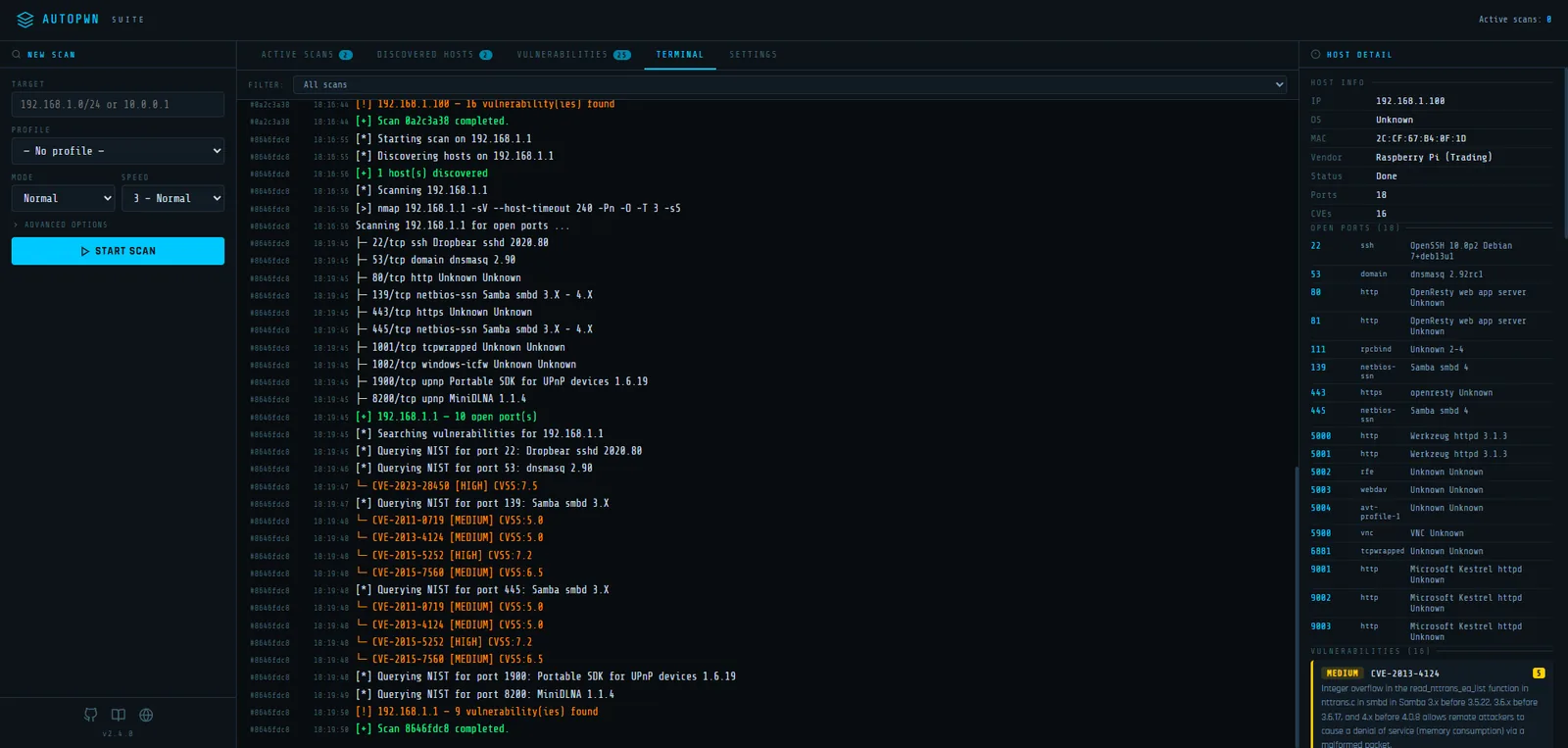
Starting the web UI
Standalone
autopwn-suite --web
autopwn-suite --web --web-host 0.0.0.0 --web-port 3000
Docker
docker compose up -d
The web UI will be available at http://localhost:8080.
Environment variables
| Variable | Default | Description |
|---|---|---|
AUTOPWN_WEB_HOST |
0.0.0.0 |
Listen address |
AUTOPWN_WEB_PORT |
8080 |
Listen port |
AUTOPWN_DATA_DIR |
modules/ |
Directory for settings, profiles, and schedule JSON files |
REST API Reference
All endpoints accept and return JSON. The web dashboard is a single-page app that consumes this API.
Scans
| Method | Endpoint | Description |
|---|---|---|
GET |
/api/scans |
List all scan jobs (summary) |
GET |
/api/scans/<scan_id> |
Get a single scan summary |
GET |
/api/scans/<scan_id>/download |
Download full scan results as JSON |
POST |
/api/scan/start |
Start a new scan |
POST |
/api/scan/stop |
Stop a running scan |
POST /api/scan/start body:
{
  "target": "192.168.1.0/24",
  "mode": "normal",
  "speed": 3,
  "host_timeout": 240,
  "scan_type": "arp",
  "nmap_flags": "-p 1-1000 --version-intensity 3",
  "scan_ports": true,
  "scan_vulns": true,
  "skip_discovery": false,
  "api_key": ""
}
POST /api/scan/stop body:
{
  "scan_id": "uuid-here"
}
Input validation: targets and nmap flags are checked against shell metacharacter blocklists and regex patterns to prevent command injection.
Hosts / Log / Events
| Method | Endpoint | Description |
|---|---|---|
GET |
/api/hosts |
All discovered hosts (merged across all scans) |
GET |
/api/log |
Log history (up to 5000 entries) |
GET |
/api/events |
SSE event stream for real-time updates |
The SSE stream at /api/events pushes log entries as they happen. Each event is a JSON object:
{
  "scan_id": "abc-123",
  "ts": "14:30:45",
  "level": "info",
  "msg": "[*] Scanning 192.168.1.1"
}
Levels: info, warning, error, success, __scan_done__ (internal).
Settings
| Method | Endpoint | Description |
|---|---|---|
GET |
/api/settings |
Get all settings (password masked) |
PUT |
/api/settings |
Update settings (deep merge) |
POST |
/api/settings/test_email |
Send a test email |
POST |
/api/settings/test_webhook |
Send a test webhook ping |
Settings structure:
{
  "nist_api_key": "",
  "email": {
    "enabled": false,
    "smtp_host": "",
    "smtp_port": 587,
    "username": "",
    "password": "",
    "from_addr": "",
    "to_addr": "",
    "on_complete": true,
    "on_error": true,
    "on_vuln_found": true
  },
  "webhook": {
    "enabled": false,
    "url": "",
    "on_complete": true,
    "on_error": true,
    "on_vuln_found": true
  }
}
Profiles
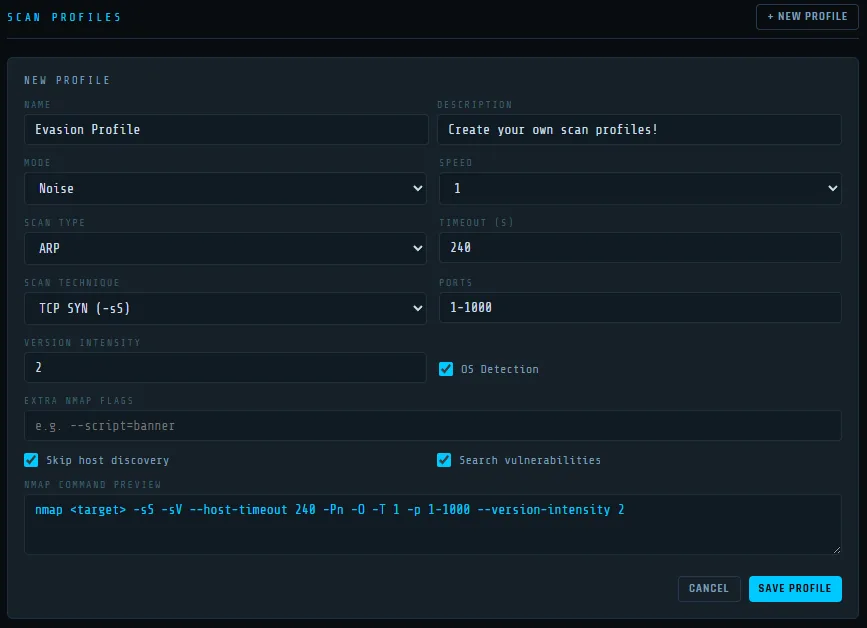
| Method | Endpoint | Description |
|---|---|---|
GET |
/api/profiles |
List all scan profiles |
POST |
/api/profiles |
Create a profile |
PUT |
/api/profiles/<id> |
Update a profile |
DELETE |
/api/profiles/<id> |
Delete a profile |
POST /api/profiles body:
{
  "name": "Stealth Scan",
  "description": "Low and slow evasion profile",
  "mode": "evade",
  "speed": 1,
  "scan_type": "arp",
  "scan_technique": "-sW",
  "ports": "1-1000",
  "version_intensity": 2,
  "os_detection": true,
  "nmap_flags": "",
  "host_timeout": 300,
  "scan_ports": true,
  "scan_vulns": true,
  "skip_discovery": false
}
Schedules
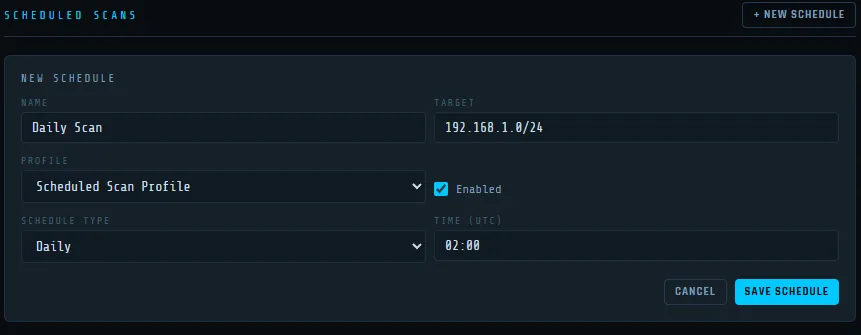
| Method | Endpoint | Description |
|---|---|---|
GET |
/api/schedules |
List all scheduled scans |
POST |
/api/schedules |
Create a schedule (requires profile_id) |
PUT |
/api/schedules/<id> |
Update a schedule |
DELETE |
/api/schedules/<id> |
Delete a schedule |
POST /api/schedules body:
{
  "name": "Nightly Scan",
  "target": "192.168.1.0/24",
  "profile_id": "uuid-of-profile",
  "enabled": true,
  "type": "daily",
  "time_utc": "02:00",
  "interval_value": 24,
  "interval_unit": "hours",
  "weekday": 0
}
Schedule types:
interval– fires every N minutes/hours/days.daily– fires once per day attime_utc(HH:MM).weekly– fires once per week onweekday(0=Monday) attime_utc.
Other
| Method | Endpoint | Description |
|---|---|---|
GET |
/api/version |
Returns {"version": "..."} |
GET |
/ |
Serves the dashboard (index.html) |
Notifications
When enabled, scan completion triggers an HTML email containing:
- Scan metadata (target, scan ID, status, nmap command, timing)
- Per-host open ports table
- Per-host vulnerability table with CVE ID, severity, CVSS score, and description
- AutoPWN Suite icon as an inline CID attachment
Webhook
When enabled, scan completion POSTs a JSON payload:
{
  "event": "scan_completed",
  "scan_id": "abc-123",
  "target": "192.168.1.0/24",
  "host_count": 3,
  "vuln_count": 12,
  "started_at": "2025-01-15T14:30:00Z",
  "finished_at": "2025-01-15T14:35:22Z",
  "error": "",
  "timestamp": "2025-01-15T14:35:22Z"
}
Both email and webhook support conditional triggers: on_complete, on_error, on_vuln_found.
Installation & Quick Usage
Clone & install
git clone https://github.com/GamehunterKaan/AutoPWN-Suite.git
cd AutoPWN-Suite
pip install -r requirements.txt
Run automatic scan
autopwn-suite -y
Scan a specific target
autopwn-suite -t 192.168.1.100
Set scanning speed (0-5)
autopwn-suite -s 5
Choose mode (normal / evade / noise)
autopwn-suite -m evade
Custom nmap flags
autopwn-suite -nf "-p 1-1000 --version-intensity 3"
Output file and format
autopwn-suite -o result.html -ot html
autopwn-suite -o result.svg -ot svg
autopwn-suite -o result.txt -ot txt
Reporting
# Webhook
autopwn-suite --report webhook --report-webhook <URL>

# Email
autopwn-suite --report email --report-email-to [email protected] \
  --report-email-from [email protected] \
  --report-email-server smtp.example.com \
  --report-email-port 587 \
  --report-email [email protected] \
  --report-email-password yourpassword
Use -h or --help to see all options.
Use as a module
from autopwn_suite.api import AutoScanner

scanner = AutoScanner()
json_results = scanner.scan("192.168.0.1")
scanner.save_to_file("autopwn.json")
Docker
# Web UI via Docker Compose
docker compose up -d

# CLI via Docker
docker run -it --net=host gamehunterkaan/autopwn-suite -t 192.168.1.0/24 -y
Development and Testing
Installing dependencies
poetry install
Running tests
# Run all tests with coverage
poetry run test

# Run tests without coverage
poetry run test --no-cov

# Run only unit tests
poetry run test -m unit

# Run only integration tests
poetry run test -m integration

# Run tests excluding slow tests
poetry run test -m "not slow"
Contributing & Developer Notes
- Add new feature modules under
modules/. Import or register them withapi.pyor the CLI where appropriate. - To add a new CVE source, implement a function that returns
Vulnerabilitydataclass objects matching the shape used bynist_search.searchCVE. - Implement new output formats by adding an exporter and registering its flag in
utils.pySaveOutput(). - Web UI API endpoints are defined in
_build_app()insidemodules/web_ui.py.
I would be glad if you are willing to contribute this project. I am looking forward to merge your pull request unless its something that is not needed or just a personal preference. Also minor changes and bug fixes will not be merged. Please create an issue for those and I will do it myself. Click here for more info!
License
AutoPWN Suite is licensed under the Apache License 2.0.
This tool is intended for authorized security testing only. You are responsible for complying with all applicable laws.
Support or Contact
Having trouble using this tool? You can create an issue or create a discussion!