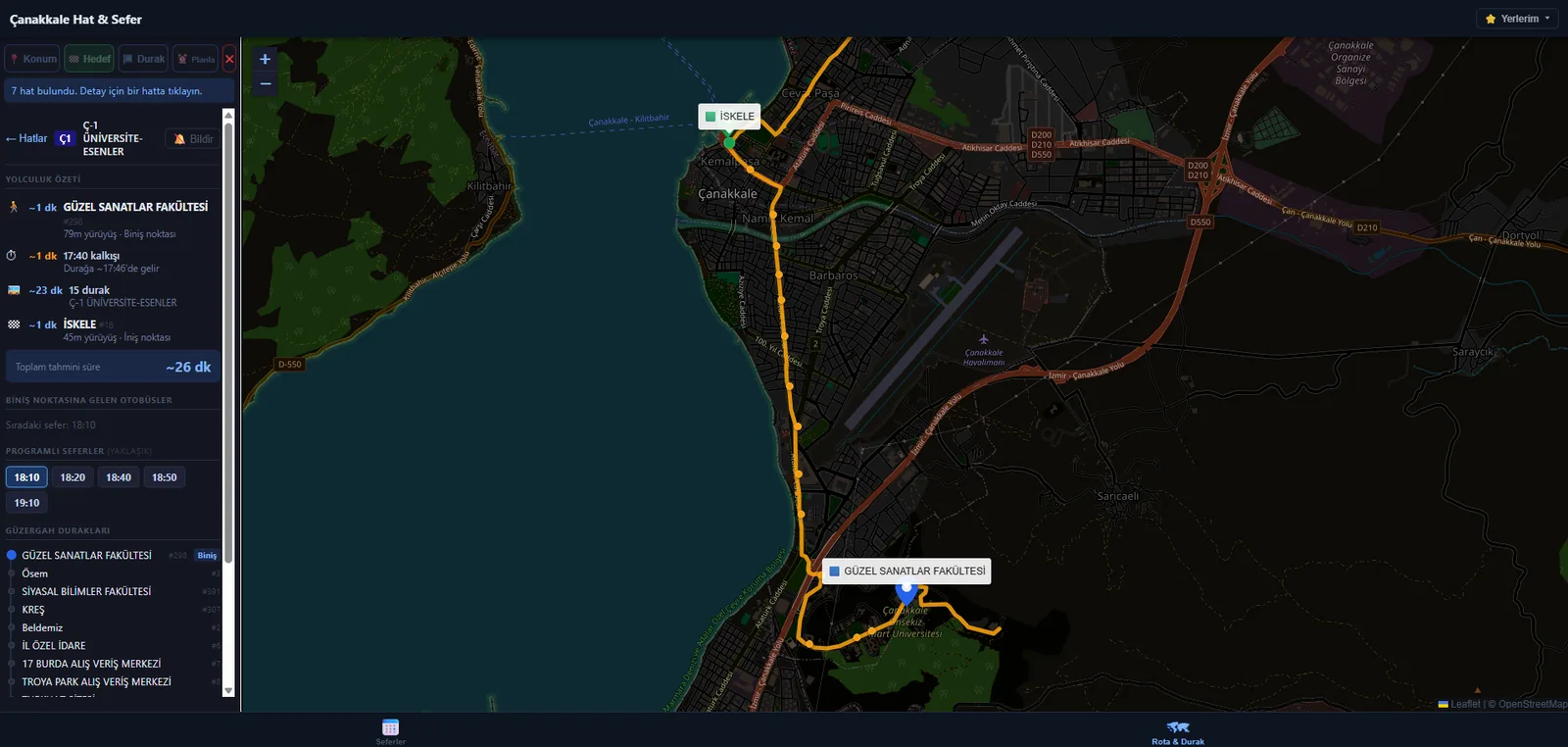
Introduction
Çanakkale’s municipal bus system has no official app. Passengers rely on a seasonal PDF timetable buried on the municipality website, with no way to know where a bus actually is, which bus to take between two points, or when to expect the next one.
Çanakkale Hat & Sefer solves all of that as a static site served from GitHub Pages. It parses the municipality’s PDF timetables automatically, pulls live bus positions from the kentkart API, plans trips with real-time ETA estimates, and delivers push notifications when your bus is approaching — even when your phone screen is off.
No app store, no native install, no backend server. Everything runs in the browser.
Features
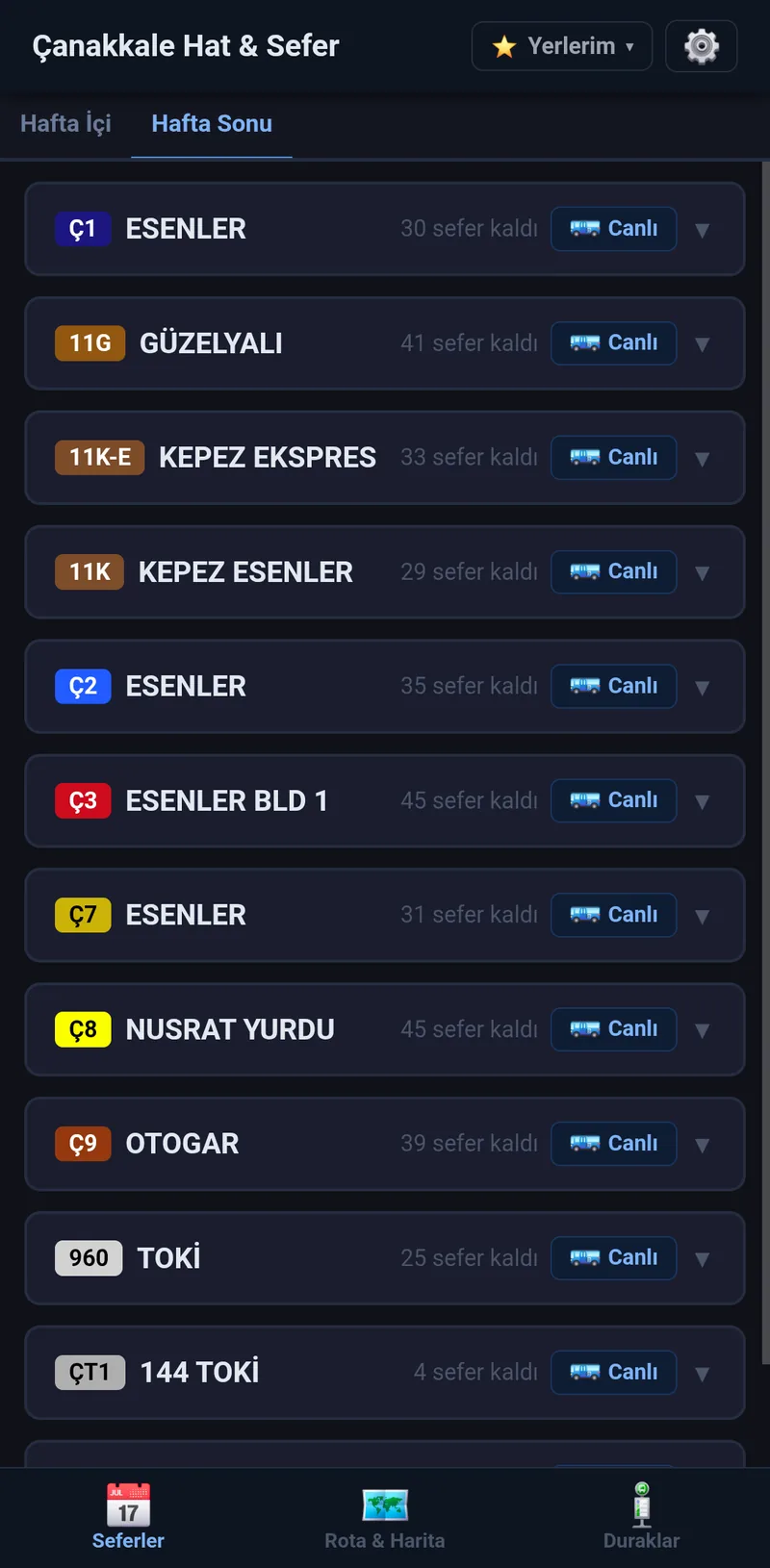
Seferler — Live Schedule
Automatically fetches every PDF timetable the municipality publishes and parses each one into structured schedules. A dynamic tab row exposes them all — regular weekday and weekend timetables alongside special-day PDFs the city posts such as Kurban Bayramı, Arefe, and dated one-offs. The tab matching today’s date is preselected.
Each tab shows all routes with departure times split by direction. On today’s tab the next upcoming departure is highlighted and past times are greyed out; other tabs show their times plain for previewing future or past days. Each route card carries the kentkart route color badge and a 🚌 Canlı button that launches the live tracker for that line.
Rota & Harita — Trip Planner & Live Map
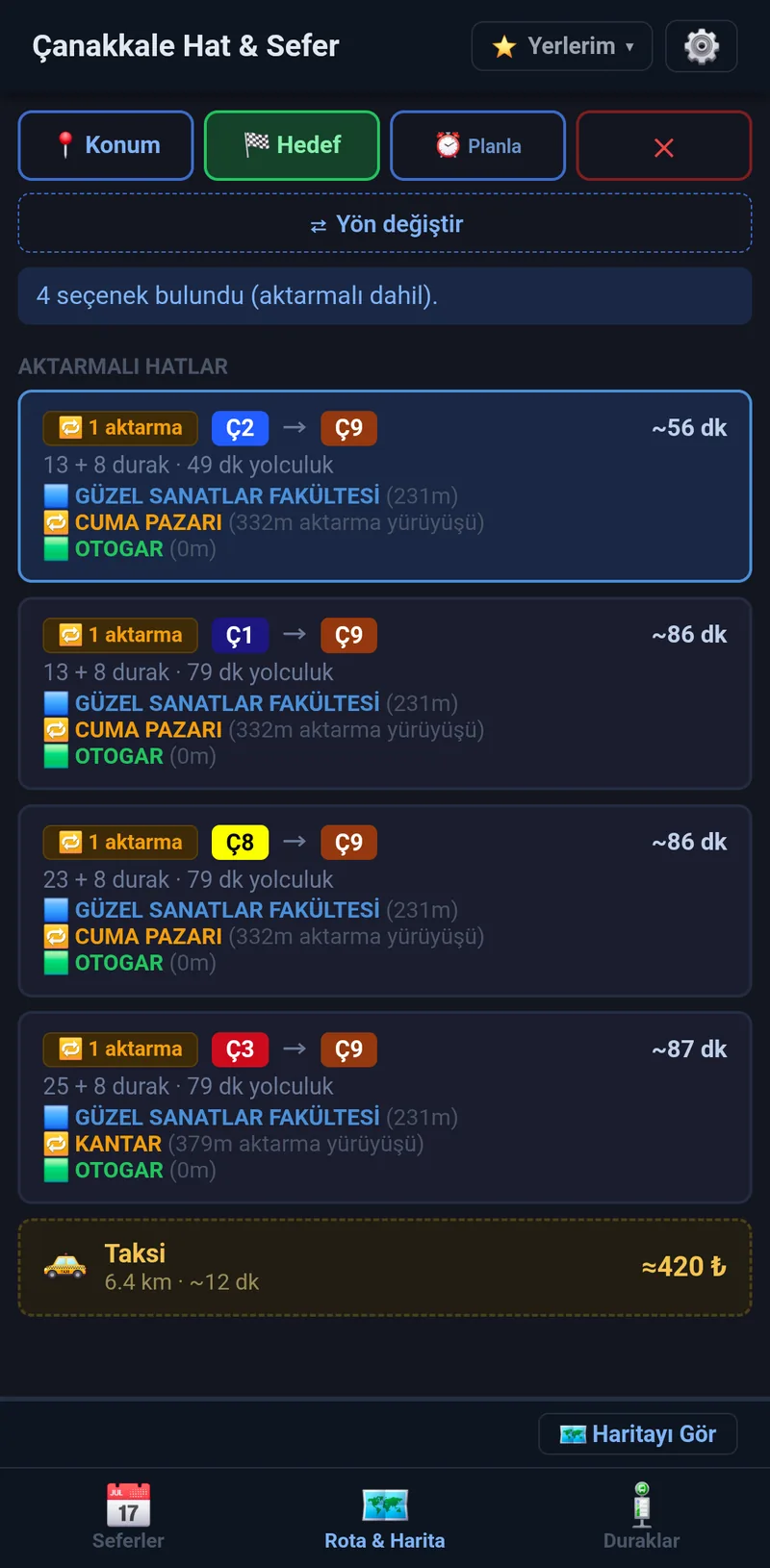
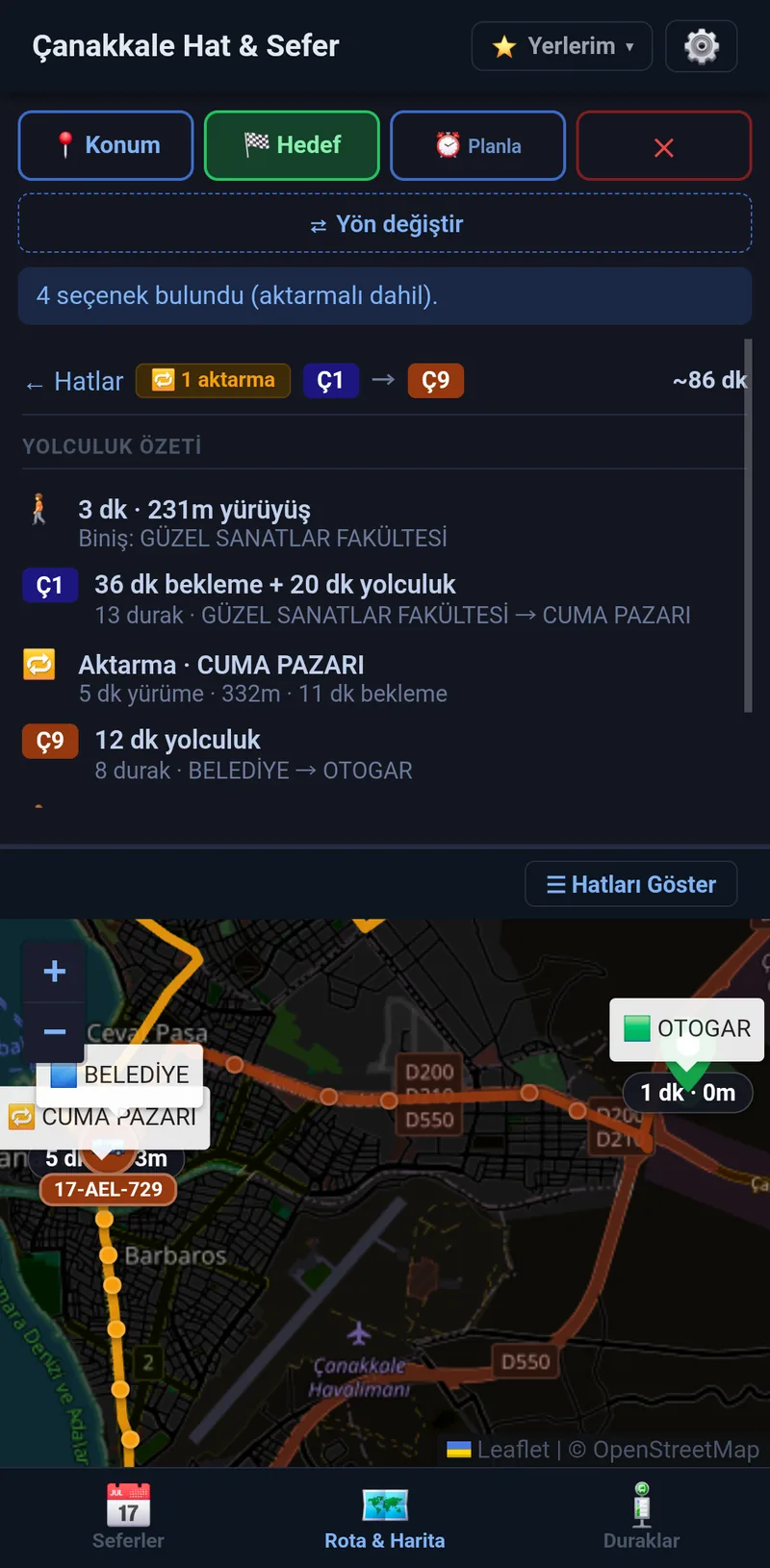
Tap the map (or use GPS) to pick a start and destination. The planner finds all direct routes and one-transfer trips connecting them and ranks results by total ETA — walk to stop + wait for next bus + ride + walk to destination.
- One-transfer trips — when no single bus connects the two points, or a transfer is faster, the planner assembles a two-leg trip with a walking transfer between lines. A transfer only outranks a direct bus when it genuinely saves time
- Real walking distances — walking segments use Valhalla pedestrian routing, so reachability and ETAs reflect actual on-foot distances that cross roads and follow footpaths, batched through Valhalla’s distance-matrix API
- Taxi alternative — each result list ends with a 🚕 taxi card showing driving distance, time, and an approximate fare from the Çanakkale tariff; tap it to draw the cab’s route on the map
- Plan ahead — time offset buttons (+30 dk, +1 sa, +2 sa) plan for departures later in the day
- Live bus data — shows buses approaching your boarding stop right now with stop-level ETAs
- Schedule fallback — when kentkart returns no live data, the next scheduled departure is used instead. On Bayram, Arefe, or any dated special day, the planner consults the matching schedule instead of the regular weekday one
- Stop browser — tap any stop on the map to see which routes serve it and when the next bus comes
- Place search — reach a destination you can’t point at by searching its name (see below)
Yer Ara — Place Search
Picking a destination used to mean tapping it on the map, which only works if you already know where it is. A search bar over the map removes that limit: type a venue, a shop, a street or a stop — Container Hall, Migros, Kordon — and the map flies there and drops a pin. The card that opens names the nearest bus stop with its distance and hands the point straight to the planner as 📍 Buradan başla or 🏁 Buraya git.
- Two sources in one list — saved places, bus stops and 6,400+ local businesses match instantly from a POI index bundled with the app, so this half works with no network at all; Photon adds the streets and addresses a POI extract has no concept of. Results are de-duplicated across the two, Turkish-folded so
kordonfinds Kordon, and ranked so a place actually named Container Hall beats a long company title that merely contains the word - Why bundle an index instead of just geocoding — OpenStreetMap, which every free geocoder indexes, does not have most Turkish businesses. Container Hall Çanakkale — a real venue 129 m from a bus stop — has zero matches in raw OSM across the entire Çanakkale bounding box, while Overture Maps carries it at 0.99 confidence, because Overture merges Meta, Microsoft, Foursquare and AllThePlaces listings on top of OSM
- Kept honest — crowd-sourced business data fails in two ways that need different answers. Listings nothing has confirmed in over a year are dropped automatically (3% of the extract, almost entirely Foursquare and Microsoft rows). Wrong coordinates on otherwise-current listings can’t be filtered at all, so those are corrected by hand in a small overrides file that is re-applied on every monthly rebuild
- Restricted to the map area — anything outside the Çanakkale bounding box is unroutable by the planner anyway, so it never appears
- Google Places is deliberately not used: its terms tie results to a Google basemap, and a static site cannot hide an API key


Live Bus Tracker
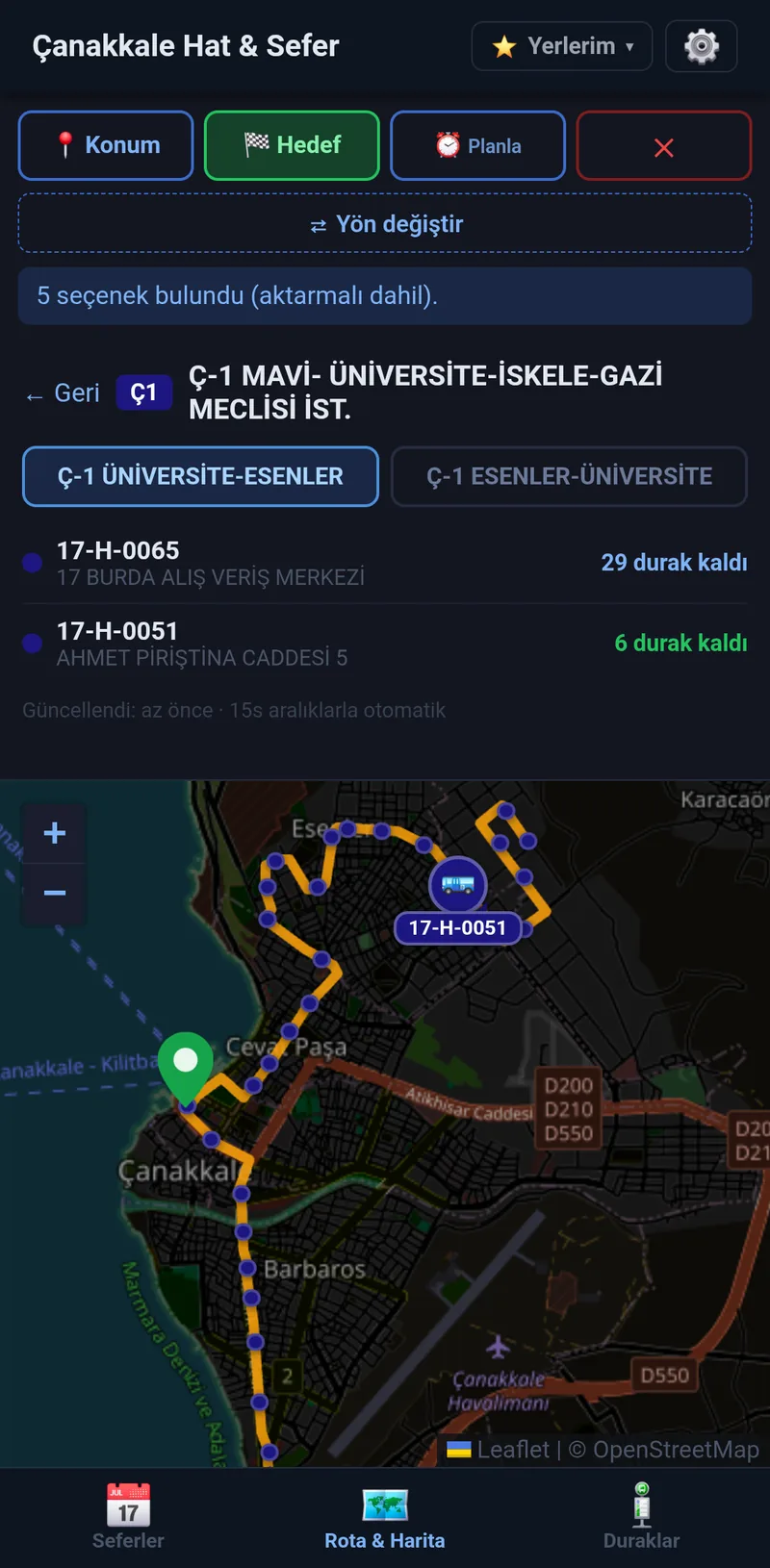
Draws the full route polyline on the map and shows all active buses with a route-colored marker, a heading arrow pointing toward the next stop, and the plate number on a colored pill below. Direction buttons switch between outbound and inbound. Auto-refreshes every 15 seconds.
Accessible from the 🚌 Canlı button on any route card in the Seferler tab, or from a trip detail in the planner.
Push Notifications
Subscribe to arrival alerts from any trip detail. Notifications fire at 10, 5, and 2 stops away — delivered through Google FCM / Apple APNs by a Cloudflare Worker, so they arrive even when the browser tab is backgrounded or the screen is off.
Saved Locations & Quick Re-Pick
Bookmark home, work, or any frequent spot. Saved locations appear in a dropdown next to the app title — tap 📍 or 🏁 to instantly set one as your origin or destination without touching the map.
The planner also remembers your last 5 destinations as a chip row, and a ⇄ Yön değiştir button swaps origin and destination in place when both are set.
Duraklar — Stop Hub
A dedicated tab for finding and managing stops without touching the map.
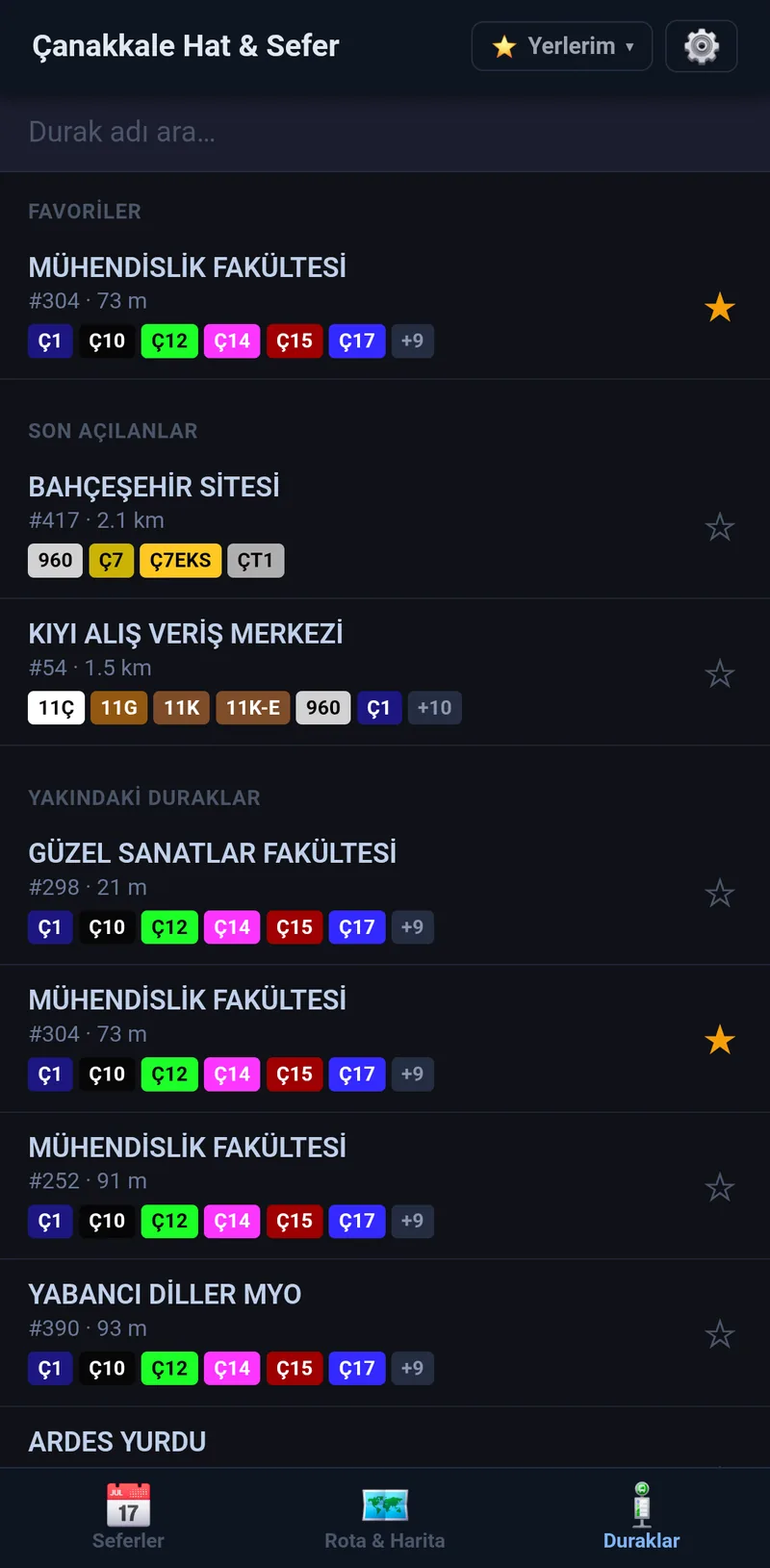
- Search by stop name with Turkish-folded matching, so
kepezfinds Kepez andiskelefinds İskele regardless of dotted/dotless I and other Turkish letters - Favoriler — star any stop to pin it to the top of the list, persisted across reloads
- Son açılanlar — the last 5 stops you opened
- Yakındaki duraklar — the 8 nearest stops when GPS is granted, each row showing its distance, with a graceful fallback when location is denied
- Route chips — every stop row carries the kentkart route color badges that serve it, so you can pick the right stop at a glance
- Detail view — tap a stop to see its routes with live status per direction (durağa geldi, N durak uzaklıkta, aktif araç yok, or a scheduled fallback), sorted with the closest approaching bus first
- 📍 Haritada göster drops a labelled pin for that exact stop on the planner map, and 🔗 Paylaş generates a
?stop=<id>deep-link via the native share sheet or clipboard so others can open the same stop directly
Offline Mode
After a one-time tile download from Settings, the app keeps working without internet inside the Çanakkale region:
- App shell, schedule data, and stop data are served from the service worker cache
- Every OSM tile in the Çanakkale bounding box at zoom 13–16 is precached, so the map renders fully offline
- Trip planning against the cached schedule, stop browsing, and route exploration all work without network
- Live kentkart bus positions still require network — a “Çevrimdışı” badge appears in the header when the API is unreachable
Settings
A gear icon in the header opens a settings screen with theme (dark / light / follow system), walking radius and walking speed sliders that drive the ETA math, the offline map download button with live progress, and data-management controls for saved locations, recent destinations, and the onboarding card.
How It Works
High-level runtime flow
- GitHub Actions runs hourly, downloading every PDF timetable the municipality publishes — regular weekday and weekend plus any special-day PDFs. The workflow fast-skips when the source hasn’t changed since the last run.
- A Node.js script parses the PDFs with pdf.js (server-side), extracts departure times per route and direction using column-based coordinate matching, and writes
data/schedule.json. - A second script fetches all kentkart route, stop, and path data and writes
data/stops.json, stripping the live bus positions (which change every minute) so the file stays cacheable. - A separate monthly workflow downloads an Overture Maps POI extract clipped to the Çanakkale bounding box, filters it by confidence and freshness, applies hand corrections, and writes
data/places.json— the index behind the map’s place search. Monthly rather than hourly because Overture cuts one release a month. - All three JSON files are committed to the repository and served as static assets via GitHub Pages.
- The browser app fetches the schedule and stop files on first load, and the POI index lazily on the first search. A service worker caches the app shell, the JSON data, and OSM tiles so the app keeps working without network.
- Live bus positions are fetched directly from the kentkart API by the browser on demand (trip planner, live tracker, stop panel) — no proxy needed.
- The Cloudflare Worker polls kentkart every minute for subscribed routes and sends Web Push notifications when the target bus is approaching.
Sequence diagram — trip planning
Sequence diagram — push notifications
Flow diagram — data pipeline (GitHub Actions)
(bbox from core.js)"] S --> T["build-places.mjs"] T --> U["Drop below 0.5 confidence"] U --> V["Drop listings unconfirmed > 1 year"] V --> W["Dedupe same name within 60 m"] W --> X["Apply data/places-overrides.json
(drop / fix / add)"] X --> Y["data/places.json + deny rules"] Y --> Z["git commit && git push"] style A fill:#1a3a5c,stroke:#4a90d9,color:#fff style K fill:#166534,stroke:#4ade80,color:#fff style P fill:#166534,stroke:#4ade80,color:#fff style Q fill:#166534,stroke:#4ade80,color:#fff style R fill:#1a3a5c,stroke:#4a90d9,color:#fff style Y fill:#166534,stroke:#4ade80,color:#fff style Z fill:#166534,stroke:#4ade80,color:#fff
Architecture
Component overview
| Component | Where it runs | Purpose |
|---|---|---|
index.html |
Browser | Markup and CSS — the app’s shell |
ui.js |
Browser | DOM, Leaflet, localStorage, push, offline — everything that touches the browser |
core.js |
Browser / Node | Headless logic: trip planning, schedules, guided steps, taxi, i18n. No DOM, no Leaflet, so it is importable on its own and CI-enforced to stay that way |
sw.js |
Browser (Service Worker) | Web Push delivery + offline cache (app shell, JSON, OSM tiles) |
data/schedule.json |
GitHub Pages (static) | Parsed timetables + kentkart route colors, rebuilt hourly |
data/stops.json |
GitHub Pages (static) | All stops, route paths, kentkart route metadata, rebuilt hourly |
data/places.json |
GitHub Pages (static) | POI index behind the map search — ~6,400 places plus geocoder deny rules, rebuilt monthly |
data/places-overrides.json |
Repository | Hand corrections (drop / fix / add) re-applied over the POI extract on every rebuild |
scripts/fetch-schedule.mjs |
GitHub Actions (Node.js) | PDF download + parsing → schedule.json |
scripts/fetch-stops.mjs |
GitHub Actions (Node.js) | Kentkart bulk fetch → stops.json |
scripts/build-places.mjs |
GitHub Actions (Node.js) | Overture extract → filtered, corrected places.json |
worker/index.js |
Cloudflare Workers | Push notification delivery — cron trigger, KV subscription storage |
PDF parsing detail
The municipality publishes timetables as PDFs with multi-column tables. The parser uses pdf.js in Node to extract all text items with their X/Y pixel coordinates, then:
- Groups items into rows by Y-coordinate (5pt bucket)
- Identifies route headers matching
Ç\d+,ÇT\d+,\d+[ÇGK], or960 - Finds
KALKIŞ/HAREKETcolumn headers to locate departure columns - Assigns
HH:MMtimes to direction 0 or 1 based on whether their X falls within ±20pt of a departure column X — arrival (VARIŞ) columns are excluded automatically since they have noKALKIŞmarker - Filters out student (
ÖĞRENCİ) and file-header (DOSYA) false positives
Key data structures
schedule.json
{
  "schedules": [
    {
      "id": "weekday",
      "label": "Hafta İçi",
      "kind": "weekday",
      "dates": ["05-20"],
      "year": null,
      "effectiveFrom": null,
      "url": "https://ulasim.canakkale.bel.tr/...",
      "routes": {
        "Ç2 ESENLER": {
          "name": "Ç2 ESENLER ÜNİVERSİTE",
          "dir0": { "label": "ÜNİVERSİTE KALKIŞ", "times": ["06:30", "07:00", "..."] },
          "dir1": { "label": "ESENLER KALKIŞ",    "times": ["06:45", "07:15", "..."] }
        }
      }
    },
    {
      "id": "arefe-05-26",
      "label": "26 Mayıs Arefe",
      "kind": "special",
      "dates": ["05-26"],
      "year": null,
      "effectiveFrom": null,
      "url": "https://ulasim.canakkale.bel.tr/...",
      "routes": { "...": "same shape as weekday.routes" }
    }
  ],
  "routes": [ { "displayRouteCode": "Ç2", "routeColor": "e63946", "name": "..." } ],
  "fetchedAt": 1747612800000
}
The kind is one of weekday, weekend, special, effective-weekday, effective-weekend. The browser picks the active schedule from this array based on today’s Istanbul-local date: dated specials win over the weekday/weekend fallback, and effective-* entries take over from their effectiveFrom date onward.
stops.json
{
  "routes": [ { "displayRouteCode": "Ç2", "routeColor": "e63946" } ],
  "paths": [
    {
      "path": {
        "displayRouteCode": "Ç2",
        "direction": "0",
        "headSign": "Ç-2 ÜNİVERSİTE-ESENLER",
        "pointList": [ { "seq": "1", "lat": "40.152", "lng": "26.410" } ],
        "busStopList": [ { "stopId": "1234", "stopName": "Üniversite", "lat": "40.152", "lng": "26.410", "seq": "1" } ]
      },
      "route": { "displayRouteCode": "Ç2", "routeColor": "e63946" }
    }
  ],
  "stops": [ ["1234", { "stopId": "1234", "stopName": "Üniversite", "lat": 40.152, "lng": 26.41 }] ],
  "stopToRoutes": [ ["1234", [ { "routeCode": "Ç2", "direction": "0", "seq": 1 } ]] ],
  "fetchedAt": 1747612800000
}
ETA calculation
direct   ETA = walkToBoard + wait + ride + walkToDest
transfer ETA = walkToBoard + wait1 + ride1 + transferWalk + wait2 + ride2 + walkToDest

walkToBoard / walkToDest = Valhalla pedestrian distance / walkingSpeed
wait                     = live: stopsAway × minsPerStop
                           schedule: minsUntilNextDeparture (evaluated at your arrival at the stop)
ride                     = stopsFromBoardToAlight × minsPerStop
transferWalk             = straight-line distance between the two transfer stops / walkingSpeed
Walking distances come from Valhalla pedestrian routing — a stop counts as reachable only if its real on-foot distance fits your walking radius, computed in a couple of distance-matrix calls per plan. Direct and transfer trips are ranked together by ETA, with a small penalty on transfers so a change of bus has to genuinely save time to outrank a single bus. When nothing fits the walking radius, the planner falls back to longer-walk options, flagged as such. Each result list also carries a taxi estimate from Valhalla’s shortest-path car route priced against the Çanakkale tariff.
Tech
| Layer | Library / Service |
|---|---|
| Maps | Leaflet 1.9 + OpenStreetMap tiles, canvas renderer |
| Routing | Valhalla — pedestrian distance-matrix for trip walks, shortest-path car route for the taxi estimate |
| PDF parsing | pdf.js (Node.js, server-side in CI) |
| Live bus data | Kentkart public API |
| Place search | Overture Maps POI extract bundled as static JSON, plus Photon for live street/address geocoding |
| Push notifications | Web Push (RFC 8030 / 8291 / 8292) via Cloudflare Workers |
| Offline | Service worker — precached app shell, stale-while-revalidate JSON, cache-first OSM tiles |
| CI/CD | GitHub Actions — hourly cron, commits JSON to repo |
| Hosting | GitHub Pages |
| Runtime dependencies | None — no frameworks, no build step |
Deployment
The app runs entirely on free tiers:
- GitHub Pages — hosts the static files including the pre-built JSON data
- GitHub Actions — rebuilds schedule and stop data hourly with fast-skip when nothing has changed (a few minutes of compute per day), and the POI index monthly
- Cloudflare Workers — push notification delivery (free tier: 100k requests/day, 1k KV ops/day)
To deploy your own instance:
- Fork the repository
- Enable GitHub Pages (source:
mainbranch, root) - Create a Cloudflare Worker, set
VAPID_PUBLIC,VAPID_PRIVATE,VAPID_SUBJECTsecrets and a KV namespace bound asBUS_SUBS - Update
WORKER_URLinindex.htmlto your Worker’s URL andVAPID_PUBLIC_KEYto match
The GitHub Actions workflow triggers automatically every hour and commits updated JSON files when the source has changed.